0330 113 33 33

Right to Work and Digital Right to Work checks made simple

Quicker. Easier. Smoother. Your fastest route to legal compliance.

Laptop Cog Icon

Simple platform for both digital and physical checks

Calendar Icon

Up-to-date system to help prevent illegal working

Clock Icon

Results in minutes with biometric document verification

Choose your Right to Work service for straightforward Home Office compliance.

Once you’ve registered your organisation, you’ll be charged the individual check cost(s) on the system as and when you request them. No subscription or contractual tie-ins.

Number of checks
1-300
301-500
501-750
751-1000
1001+
Cog Icon Digital Right to Work
£8.41
£7.51
£6.30
£6.30
£4.50
Cog Icon Right to work
£10.20
£10.20
£6.70
£6.20
£3.80
1-300 Checks > Sign up
Cog Icon Digital Right to Work
£8.41
Cog Icon Right to Work
£10.20
301-500 Checks > Sign up
Cog Icon Digital Right to Work
£7.51
Cog Icon Right to Work
£10.20
501-750 Checks > Sign up
Cog Icon Digital Right to Work
£6.30
Cog Icon Right to Work
£6.70
751-1000 Checks > Sign up
Cog Icon Digital Right to Work
£6.30
Cog Icon Right to Work
£6.20
1001+ Checks > Sign up
Cog Icon Digital Right to Work
£4.50
Cog Icon Right to Work
£3.80
Attention

Digital Right to Work checks are more cost effective than manual checks, and require less admin work from employers uCheck’s Digital Right to Work service can only be used with a DBS check

Join our revolutionary online checking platform

Sign up NOW for a one-off fee of £58.80 inc. VAT (£49.00 + VAT)

1
Primary contact details
2
Company details
3
Additional details
4
Payment
clock icon
Rapid turnaround - 24/48 hours on average
person icon
Trusted by over 80,000 happy customers
lock icon
Secure, Home Office approved system
loader

What is a Right to Work Check and a Digital Right to Work Check?

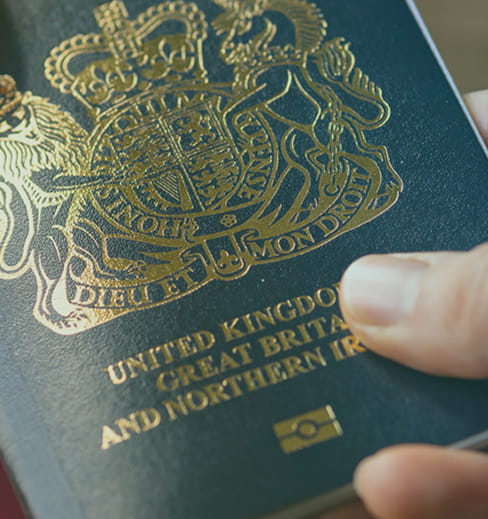
Confirm your applicant has an eligible document (e.g. in-date biometric British or Irish passport)

Choose the best check that is right for you

Right to Work checks are a legal requirement for anyone wanting to work in the UK. It is illegal to hire someone who does not have a valid Right to Work in the UK.

Right to Work icon

Right to Work

Check

Manual process

Check

Checks eligibility of international applicants

Check

Perform checks on a wider range of identity documents

Digital Right to Work icon

Digital Right to Work

Check

Requires in-date British or Irish passport, or Irish passport card

Check

Streamlines remote Right to Work processes

Check

Better experience
for employers and candidates

Passport

“Very impressed with the patience, understanding and knowledgeable staff.”

London College, 2 February 2026

Digital Right to Work checks are faster and more convenient

Check

Get checks back in minutes

Check

Save time and effort from manual checking processes

Check

Check biometric details from candidates with eligible Identity Documents

Check

Fulfil legal requirements of Right to Work checks

Check

Safeguard from up to £60,000 in fines

Check

Remotely check candidates with eligible
evidence of Right to Work

Digital Right to Work checks:

Six key steps

1

Confirm your applicant has an eligible document (e.g. in-date biometric British or Irish passport)

2

Enter your uCheck account and toggle ‘Digital Right to Work’ check when submitting a DBS check.

3

Send the applicant a link to complete the check

4

Wait for the applicant to provide a photo of their document and a selfie to verify it against

5

The system will validate the document and send you a confirmation email

6

Confirm that the applicant who arrives to work matches the verified applicant

Start your Right to Work checks
Lightning Digital RTW
ON

Digital Right to Work allows you to verify an applicant's eligibility to work in the UK remotely using digital identity verification technology powered by TrustID

“Definitely the best customer service I’ve had from a business. Highly recommend!”

Kyle Brown, 21 January 2026

Manually checking Right to Work documents

To complete an application, you’ll need to check:

  • Photographs and dates of birth are consistent across documents
  • Any visas are still in date and haven’t expired
  • If there are work restrictions, e.g. restrictions on the hours students can work per week
  • The documents are genuine and haven’t been tampered with
  • Any discrepancies in name are accounted for
  • All relevant dates are cross-referenced or verified by the appropriate embassies
Man With Tablet Computer
Any further questions? Please use our LiveChat facility or give us a call on 0330 113 33 33

Right to Work and Digital Right to Work FAQs

You should never make assumptions about a person’s eligibility to work in the UK or their immigration status. As an employer, it’s your responsibility to carry out checks on all prospective employees.

With Digital Right to Work checks, employers send an application link to their candidates. Candidates then photograph their documents and take a selfie to confirm their identity. Employers will then receive the results.

The process can be as fast as 2 minutes if the applicant completes the process as soon as it appears. However, it can take longer if the applicant waits to complete the process.

Digital Identity Verification allows applicants to digitally prove their identity by sharing ID documents using our sister-service, TrustID.

Digital Right to Work checks use Digital ID verification to prove their Right to Work in the UK.

Both services can only be used in conjunction with uCheck’s DBS checking service.

For Digital Right to Work checks, you can accept: 

  • Biometric UK or Irish passports
  • Biometric Irish passport cards

For manual Right to Work checks, the Home Office provides two lists of documents (list A and list B) that employers can accept as a person’s proof of right to work in the UK. You must only accept documents on these lists – no other documents are acceptable as proof.List A is made of documents that can be accepted for a person with a permanent right to work – for example,

  • A current or expired UK or Irish passport or Irish passport card,
  • A UK, Channel Islands, Isle of Man, or Irish birth or adoption certificate, or
  • A current Immigration Status Document from the Home Office (to name a few)

List B is made of documents that can be accepted for a person with a temporary right to work. This could be:

  • A current Immigration Status Document (with Home Office-issued photograph) with valid endorsement that the holder may stay and work in the UK
  • A Home Office document of a holder’s application for leave to enter or remain on/before 30 June 2021
  • A Home Office Application Registration Card and Positive Verification Notice

With our Right to Work service, once the check has been carried out, the results will either show ‘Complete’ if the check was completed successfully and the documents verified, or ‘Error’ if:

  • The image you uploaded is blurry or unreadable
  • A signature is missing from the document
  • Some parts or sections are missing from the document
  • The document has been manipulated, and security checks must be conducted

If you encounter an error, you can easily re-check the applicant by re-uploading any images. However, if the result shows the document has been manipulated, the Platform won’t allow you to re-check, and you will need to seek help from the Home Office.

At uCheck, we provide help and guidance in completing and securely storing your employees’ proof of right to work. Whether it’s on an individual case-by-case basis or across multiple sites within your organisation, we can assist you every step of the way.

Our online platform ensures all documents are stored securely with a full audit and reporting functions, and our electronic verification service helps to minimise security concerns by quickly and reliably determining whether certain documents have been manipulated.

See our excellent reviews below!

As seen in